Ing. Calogero Bono
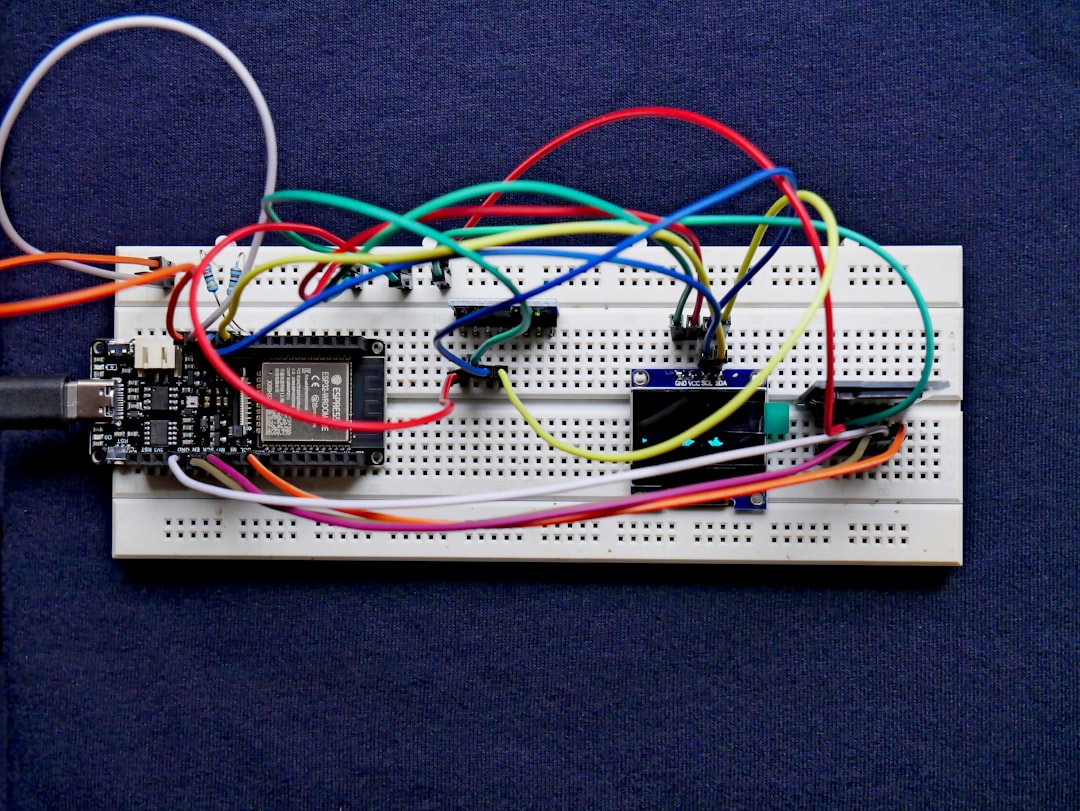
You have a warehouse to monitor, a machine to control remotely, or an environmental sensor to install in a shed. You want an IoT solution that works, costs little, and doesn't lock you into expensive platforms with monthly fees. Classic Arduino is not enough because you need connectivity. A Raspberry Pi is overkill and too expensive for a single sensor. The sweet spot is ESP32 with MicroPython. At Meteora Web, we started using this chip when a client asked us to monitor humidity in his grain silos without spending a fortune on proprietary hardware. Since then, we've built dozens of devices. This guide shows you how to get started — from firmware to your first data sent over WiFi — with everything you need for a real deployment.
Why ESP32 and MicroPython for low-cost IoT compared to other platforms?
If you come from Arduino, you know C++ and the frustration of writing low-level code just to blink an LED. With MicroPython you can prototype in hours, not days. But the real difference is the cost-performance ratio: an ESP32 module costs between 5 and 10 euros, has built-in WiFi and Bluetooth, dual-core 240 MHz, 520 KB RAM, and supports peripherals like SPI, I2C, UART, ADC, DAC. It blows away an Arduino Uno. Plus, with MicroPython you get an interactive Python REPL via serial or WiFi — debug on the fly, no recompile. We used it for a small temperature logging system in an olive oil mill: DS18B20 sensor with a long cable, ESP32 pushes data to a Google Sheet via HTTP POST. Total cost: less than 20 euros. Zero subscriptions. It's been running for two years.
How to set up the development environment for ESP32 with MicroPython?
First, no huge IDEs. You just need a text editor, the MicroPython firmware, and a flashing tool. Here are the steps.
Download and flash MicroPython firmware
Go to micropython.org/download and grab the latest stable release for ESP32 generic. Connect the board via USB, find the serial port (e.g., /dev/ttyUSB0 on Linux, COM3 on Windows). Use esptool.py to erase and flash:
pip install esptool
# Erase flash
python -m esptool --chip esp32 --port /dev/ttyUSB0 erase_flash
# Flash firmware
python -m esptool --chip esp32 --port /dev/ttyUSB0 --baud 460800 write_flash -z 0x1000 esp32-20220117-v1.18.bin
After flashing, connect via serial with screen or PuTTY and press Enter: you should see the MicroPython REPL prompt.
Recommended development tools
We use Thonny (Python IDE with native MicroPython support) or ampy (command-line file upload tool). In Thonny, select the port, click Interpreter > MicroPython (ESP32), and you're ready to write code directly on the board. For larger projects, MicroPython-viper or mip (package manager) come in handy.
How to connect ESP32 to WiFi with MicroPython and send data?
The beauty of MicroPython is that WiFi connection takes just a few lines. Here's a basic script that connects to a network, makes an HTTP request to an API, and prints the response.
import network
import urequests
import time

SSID = "YourWiFiSSID"
PASS = "YourWiFiPassword"

def connect_wifi():
    wlan = network.WLAN(network.STA_IF)
    wlan.active(True)
    if not wlan.isconnected():
        print("Connecting to", SSID)
        wlan.connect(SSID, PASS)
        while not wlan.isconnected():
            time.sleep(1)
    print("Connected! IP:", wlan.ifconfig()[0])
    return wlan

wlan = connect_wifi()

# Example: send data to an endpoint
response = urequests.get("https://api.meteoweb.com/sensors?temp=22.5")
print("Response:", response.text)
response.close()
Note: if your endpoint uses HTTPS, make sure CA certificates are included (MicroPython bundles them for some domains) or use HTTP for testing. This code works on any ESP32 running MicroPython firmware.
How to handle Bluetooth with MicroPython on ESP32?
ESP32 supports both Bluetooth Classic and BLE. For low-cost IoT, BLE is the standard choice: lower power consumption, perfect for battery-powered sensors. MicroPython has a bluetooth module (since v1.18+). Here's how to create a BLE server that publishes a value.
import bluetooth
import struct
import time

bt = bluetooth.BLE()
bt.active(True)

# Define a service and a characteristic
UART_SERVICE_UUID = bluetooth.UUID("6E400001-B5A3-F393-E0A9-E50E24DCCA9E")
UART_TX_CHAR_UUID = bluetooth.UUID("6E400003-B5A3-F393-E0A9-E50E24DCCA9E")
UART_RX_CHAR_UUID = bluetooth.UUID("6E400002-B5A3-F393-E0A9-E50E24DCCA9E")

TX_CHAR = (UART_TX_CHAR_UUID, bluetooth.FLAG_NOTIFY | bluetooth.FLAG_READ,)
RX_CHAR = (UART_RX_CHAR_UUID, bluetooth.FLAG_WRITE,)
UART_SERVICE = (UART_SERVICE_UUID, (TX_CHAR, RX_CHAR,))

((tx_handle,),) = bt.gatts_register_services((UART_SERVICE,))

# Write a value to the characteristic
value = 25.3
bt.gatts_write(tx_handle, struct.pack('<f', value))

# Start advertising
bt.gap_advertise(100, adv_data=b'\x02\x01\x06\x03\x03\x9e\x40')
print("BLE active, published value:", value)
This code is minimal but functional. For a real app, you'll need to handle connections, notifications, and power management. We built a BLE-to-WiFi bridge to collect data from sensors in a basement (no WiFi signal) and send it to the cloud via a central ESP32.
What are the real limitations of ESP32 with MicroPython and how to overcome them?
MicroPython is convenient, but it's not C. Memory management is automatic, but the heap can fragment over long periods. Execution speed is about 10-20 times slower than Arduino C++. For applications requiring tight timing (e.g., reading an encoder at 10 kHz), stick with C. Also, interrupt stack depth is limited. To work around these limits, we use a hybrid approach: rapid prototyping with MicroPython, then rewrite critical functions in C using the micropython.viper module or native calls via @micropython.native. For most environmental monitoring projects (samples every minute or hour), MicroPython is more than enough.
What to do now to get started with ESP32 and MicroPython?
1. Buy an ESP32 — cheap models: ESP32-DevKitC, NodeMCU-32S, or ESP-WROOM-32. Prices range from $5 to $12 on AliExpress or Amazon.
2. Flash MicroPython firmware — follow the steps above. Use Thonny to test.
3. Solder your first sensors — a DHT22 for temperature/humidity or a DS18B20 (waterproof). Connect VCC, GND, and DATA to a GPIO.
4. Write a script that reads the sensor and sends data to a server — use the WiFi example code.
5. Automate startup — rename your main script to main.py on the board: MicroPython runs it at boot.
6. Monitor power consumption — if using batteries, put the ESP32 into deep sleep between readings. Here's a snippet:
import machine
import time

# Read sensor, send data, then deep sleep for 300 seconds
# machine.deepsleep(300_000)  # in milliseconds
We designed a fridge cell monitoring system for an ice cream distributor: each ESP32 wakes up every 10 minutes, reads temperature, sends it over WiFi, and goes back to deep sleep. With two AA batteries it lasts over a year. That's the beauty of low-cost IoT: full control, minimal costs, no expensive external cloud. If you want to dive deeper into IoT architectures and protocols, read our pillar on IoT and programmable hardware. For securing your connected devices, check out the guide on Smart Contract Security — though blockchain-related, the firmware hardening principles are similar.