 Ing. Calogero Bono
Apple has made Retention Messaging available, the feature announced at this year's WWDC. Developers can show messages, images or special offers at the moment a user is about to cancel a subscription. Until now Apple only stepped in after cancellation, with the Win-Back Offers of 2024. Now the battle is fought earlier, and this changes how recurring revenue is designed on iOS.
A few terms before we get into the facts. Retention Messaging is the message shown on a subscription's cancellation screen. App Store Connect is the dashboard where developers manage their apps. Save rate is the percentage of subscribers who stay after reaching the cancellation confirmation. Win-Back Offers are offers aimed at those who have already cancelled. Endpoint is the server address that responds to App Store requests.
What is Retention Messaging and when does it appear?
According to the official WWDC26 session, the message appears in the cancellation flow, when the customer is weighing whether to cancel. It can take three forms – text only, text with an image, or text with an offer.
As 9to5Mac reports, the novelty compared with 2024 is precisely the timing. Win-Back Offers arrived once cancellation had already happened or the subscription had expired. Here the user has not yet finished.
For iPhone users, as MacRumors explains, it means seeing discounts or reasons to stay before cancelling.
How is it set up in App Store Connect?
On the Subscriptions page a new area appears to get started. The developer creates a message, writes the text, chooses an image from the Asset Library and selects the subscriptions to link it to. A preview updates in real time.
The text is mandatory, while image and offer are optional. You can choose multiple offers and, Apple says, the App Store automatically picks the best one for eligible customers. If the customer is entitled to an offer, this replaces the image.
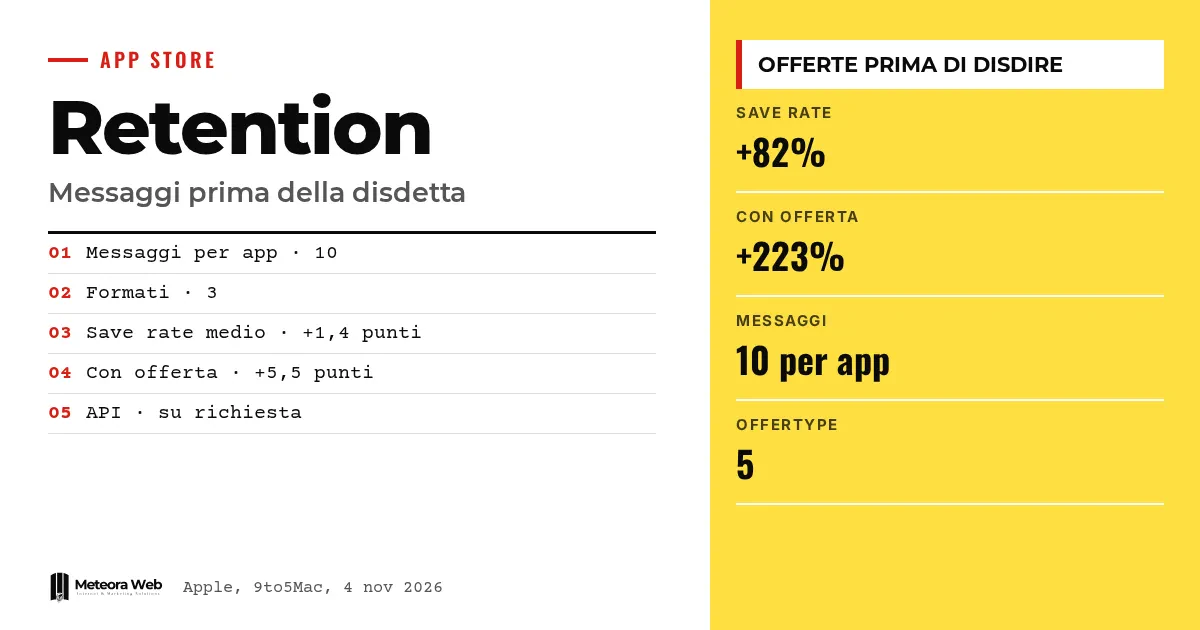
According to Apple, you also set subscriber eligibility and the waiting time between messages. The limit is 10 messages per app, each linkable to one or more subscriptions.
What does the real-time version add?
With the real-time version the developer sets up an endpoint that responds to a server-to-server request from the App Store. The request contains, among other things, the originalTransactionId, the customer's language and a tracking identifier. The server decides which message to show.
This mode also allows the switch plan format, meaning offering another plan from the same subscription group, for example the annual one, in place of cancellation.
API access is available on request. Only in sandbox is there a performance test, and passing it is mandatory before using the feature in production.
Does it really work? The numbers Apple declares
Apple states that subscriptions that adopted Retention Messaging see an average save rate increase of 1.4 points, equal to +82%. Messages with a promotional offer reach the highest observed figure, +5.5 points, that is +223%. Apple itself notes that results vary from developer to developer.
These are the company's figures, not verified by third parties. The starting values are missing, so it is unclear how much the gain weighs in absolute terms.
For testing, messages can be tried in sandbox. Redeemed offers appear with a new offerType of value 5 in the signed transaction.
To go deeper, Siri AI opens to all developers with the iOS 27.3 Developer Preview and iOS 27.3, Apple releases the first developer beta one week after 27.2.
Limits to know
The save rate data comes only from Apple and there is no independent verification. We do not know on how many subscriptions it is calculated or for which app categories. It is not clear how user behaviour will change once the messages become common. Apple's rules on how apps can use that space may also evolve.
What changes for those who work in digital
If you have an app with subscriptions, cancellation becomes a product point to design. It is worth deciding which offer to show, to whom and at what interval, instead of leaving the screen empty. If you do not have a dedicated backend, start from App Store Connect. Real-time requires a server that responds quickly and passes the performance test, work close to iOS and Android app development. If you are a user, expect more last-minute offers when you try to cancel.
Our take
The logic makes sense. An offer before cancellation is better than one after, and Apple keeps it inside the official flow, without letting every app improvise hostile pages. The risk remains the one flagged by Smartworld, namely one more obstacle for those who want to leave. The cap of 10 messages and the waiting time help. Quality, however, will depend on developers. Those who use the message to remind people of real value benefit, while those who use it to push harder lose trust.
Frequently asked questions
What is Retention Messaging?
It is an App Store feature that shows messages, images or offers within a subscription's cancellation flow. It is meant to remind users of the service's value before they cancel.
How is it different from Win-Back Offers?
Yes, they differ. The 2024 Win-Back Offers target those who have already cancelled or let the subscription expire. Retention Messaging steps in before the cancellation is completed.
How many messages can a developer create?
Up to 10 per app. Each can be linked to one or more subscriptions, with eligibility rules and a waiting time between messages.
Do you need a server to use it?
Not for the version in App Store Connect. For the real-time version you need an endpoint that responds to the App Store, and API access is requested from Apple.
Are discounts guaranteed for users?
No. It depends on each developer, who decides whether to show a message and which offer to propose. The App Store picks the best offer among those configured for eligible customers.
What to watch in the coming months for iOS subscriptions
The feature has just launched and the first real results will come from developers. What matters is whether it works beyond the data Apple has declared.
- Follow the save rate data developers publish, to compare it with Apple's figures.
- Check the App Store guidelines for any limits on how messages can be used.
- Request API access if you plan to use dynamic messages, so you have time to pass the performance test.