 Ing. Calogero Bono
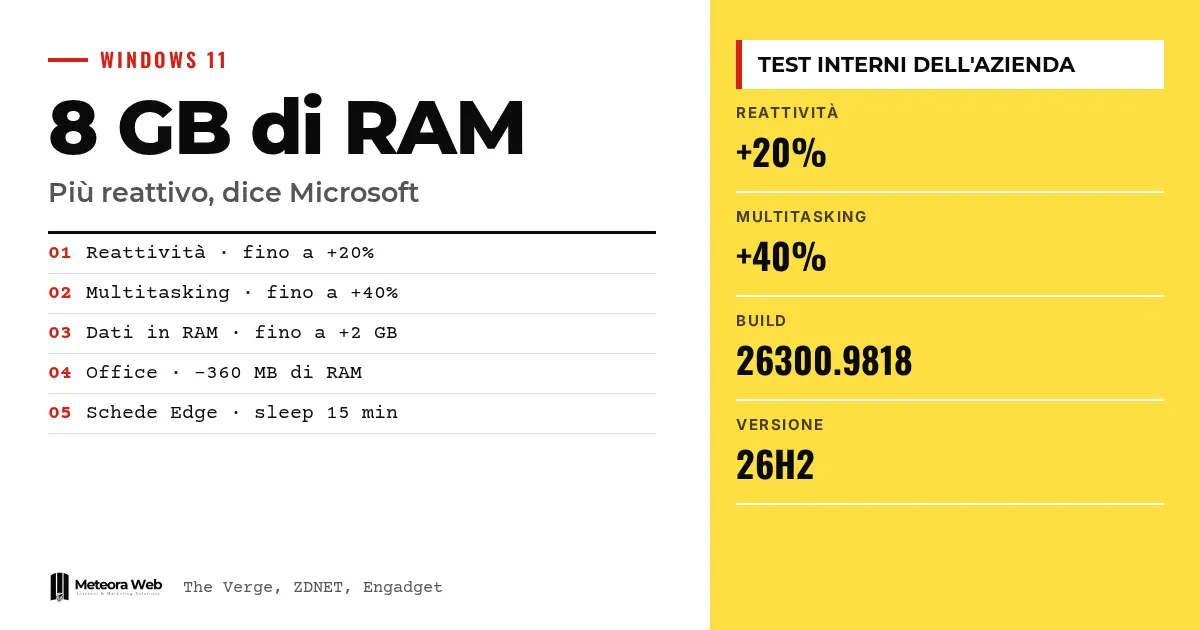
Microsoft claims that Windows 11 on PCs with 8 GB of RAM is now up to 20% more responsive and up to 40% faster at multitasking. It announced this in an official post, later picked up by The Verge, ZDNET, Tom's Hardware, Engadget and Windows Central. It matters because the memory and storage crunch is pushing prices up, and 8 GB PCs are becoming a common choice again, even for businesses.
A few terms, before we get into the facts. RAM is the PC's working memory, where open apps live. Memory compression means reducing rarely used data so it stays in RAM instead of being moved to the disk. Paging file is disk space used as backup memory, much slower. Build is the exact version number of the installed Windows. Efficiency Mode is the mode that reduces the resources an app consumes.
What did Microsoft announce about PCs with 8 GB of RAM?
According to The Verge, Windows chief Pavan Davuluri says that on these PCs Windows is "up to 20 percent more responsive" and multitasking up to 40 percent faster in the company's lab test.
The comparison, explains ZDNET, is with the January 2026 version. The work, writes Tom's Hardware, follows three lines. Using memory better, protecting the actions that must feel instant, and having Windows and the main apps consume less memory.
How did they get these results?
The first intervention is on compression. Microsoft says Windows can keep up to 2 GB more of active data in memory, instead of moving it to slower storage. An app or tab left open should therefore need to reload less often.
The second concerns Start, File Explorer, Settings, search and right-click. Windows postpones background tasks such as search indexing while you work. Edge, according to Engadget, opens up to 33% faster, and in Teams Efficiency Mode is on by default on 8 GB PCs.
How much memory do the apps save?
Word, PowerPoint, Excel and Outlook use 360 MB less RAM. Third-party apps such as WhatsApp also benefit. Microsoft speaks of committed memory growth reduced by up to 900 MB across Windows, Edge and the 365 apps.
- On 8 GB, Widgets load only when you open them, saving about 200 MB.
- In Edge, inactive tabs go to sleep after 15 minutes, compared with two hours before.
What do you need to see the improvements?
You need Windows 11 26H2, build 26300.9818 or later. As ZDNET points out, build 26300.9711 is fine for now if you do not want to install the optional preview. Check under Settings, System, About. Microsoft also recommends keeping apps updated, because some improvements come from there.
On the rollout of the version you can find our in-depth piece on Windows 11 26H2 and known issues.
Limits to know
The figures come from Microsoft's internal tests, run, Tom's Hardware notes, under favorable conditions. The 40% refers to a specific load with 20 Edge tabs, a 4K video and large Office files. We have no independent measurements and do not know how it will work with your programs. Microsoft itself admits that with 16 or 32 GB you can do more.
What changes for those who work with digital tools
For a business, an 8 GB laptop becomes defensible again for email, browsing and Office, especially when memory is expensive. The reason for the price increase is AI demand, as explained in the story of Apple's margins. Before buying, though, test the real workload of your employees. Those who use video, graphics or virtual machines are better off with 16 GB or more. If you manage fleets of PCs, check that they are on the right build.
Our take
The signal is useful, but it should be read for what it is. Microsoft is fixing a Windows that has become heavy, and it is doing so because the market forces it to, not by choice. Optimizing is a good thing, but the effort stems from the price of RAM, not from a change in approach. The debate over the right place for RAM shows how open the question still is. Trust the numbers only after you have tried them yourself.
Frequently asked questions
Is Windows 11 fine with 8 GB of RAM?
For office use, yes, according to Microsoft the latest updates make it run better. For heavy workloads, 16 GB or more is still recommended.
Which version do I need?
Windows 11 26H2, build 26300.9818 or later. According to ZDNET, build 26300.9711 is enough for now.
Are Microsoft's numbers reliable?
They are claims based on internal tests. Tom's Hardware points out that the conditions are favorable and there are no independent checks.
How much RAM do the Office apps save?
Word, PowerPoint, Excel and Outlook use up to 360 MB less. Inactive Edge tabs go to sleep after 15 minutes.
Is RAM the only thing that matters?
No. Microsoft says a 2026 Dell XPS 13 with 8 GB has 94% more multi-core performance than a 2021 model with 8 GB.
What to watch for in the coming months on Windows memory
Microsoft promises further work on RAM management. It is worth following whether the promises turn into measurable results.
- Check whether memory compression really becomes more efficient, as announced.
- Check whether File Explorer and Notepad in WinUI 3 use less memory.
- Look for independent tests on 8 GB PCs before ordering more machines.
Sources
- engadget.com, Microsoft has listed some concrete ways that Windows 11 is getting better with 8GB of RAM
- windowscentral.com, Microsoft made Windows 11 more responsive on these 8GB laptops
- tomshardware.com, Windows 11 8GB RAM configurations get a performance boost — As AI demand keeps pushing prices up, Microsoft says Windows is now 20% more responsive, multitasking 40% faster on memory-constrained machines
- zdnet.com, Windows 11 can run better on PCs with 8GB now, Microsoft says – here’s why
- theverge.com, Windows 11 is now ‘up to 40 percent faster’ on PCs with 8GB of RAM