 Ing. Calogero Bono
On the night between Sunday and Monday, the emergency alert apps of Ukraine and Russia were hit by cyberattacks. Ukrainian citizens received false warnings about radiation, chemical attacks and a missile carrying a nuclear warhead. A few hours later, similar messages appeared in Russia. The case matters because it shows how fragile an alert channel becomes when it depends on a single app, even in the hands of a state.
A few terms before we get into the facts. Push notification is the message the app sends to your phone even when it is closed. Compromise means unauthorized parties have gained control of a system, or part of it. Air Alarm is the Ukrainian app that reports air raids. Telegram is the channel where the authorities issued their denial. Vulnerability is a software flaw that an attacker can exploit.
What happened to the alert apps?
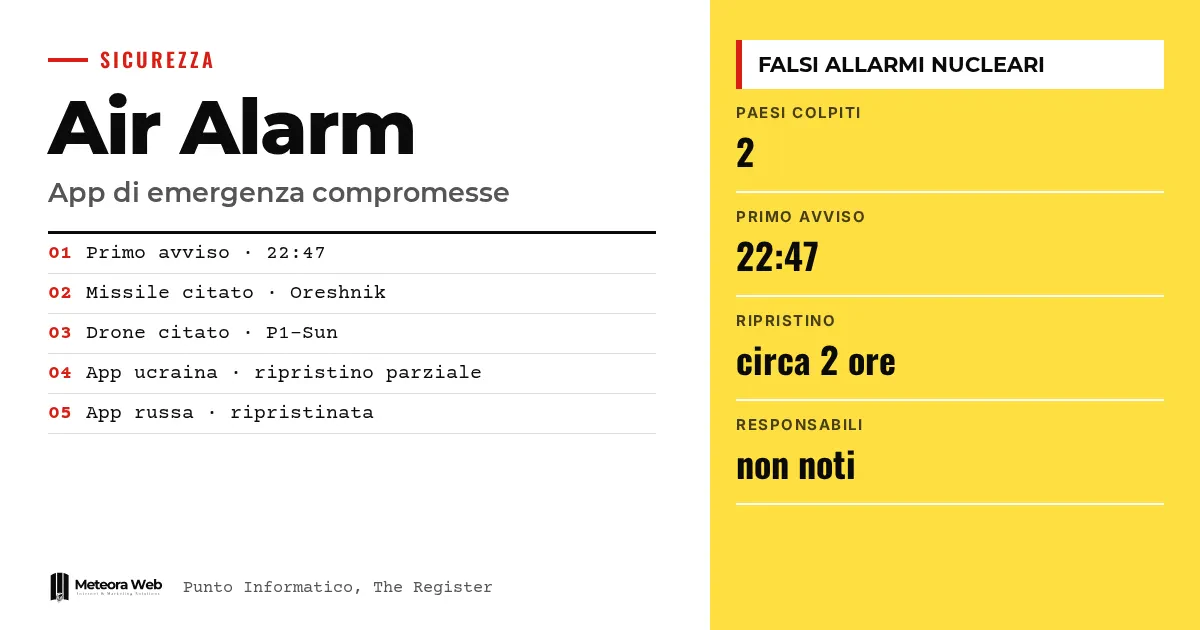
According to Punto Informatico, from 22:47 local time on Sunday Ukrainians received alerts through Air Alarm about possible radiation, chemical attacks and fighting in the streets. One message said Russia had launched an Oreshnik ballistic missile with a nuclear warhead.
The account from The Register adds that the false alerts also referred to clashes in Kyiv. The authorities of both countries confirmed the attacks.
How did the Ukrainian authorities respond?
Ukraine's air force denied the messages on Telegram. Speaking to The Register, it said the app was "probably compromised" and that "there is no radiation threat." Push notifications were disabled and the service was suspended.
About two hours later the app was gradually restored. The map of targets remains suspended, while the app shows only the danger level, yellow or red. The Ministry of Digital Transformation pointed to other channels, such as iOS and Android emergency alerts, sirens and official government accounts.
What happened in Russia?
Russia's Ministry for Emergency Situations described a "massive cyberattack" on the app, which allowed false information to be sent. According to the ministry, the messages announced nuclear attacks "on all regions of Russia" and cited the P1-Sun drone.
About 90 minutes later the ministry declared the app working again. It clarified that hitting the app does not amount to compromising the national alert system, which is based on sirens, SMS, television and radio. The app, it said, is only a support service.
Why did the messages look fake right away?
The first Ukrainian message was written in Russian, while official Ukrainian communications are always in Ukrainian. For Punto Informatico, this made it clearly false. The Register notes that this detail, together with the name Oreshnik, was an immediate signal.
Ukrainian lawmaker Oleksander Merezhko told the BBC that the attack is almost certainly part of Russia's cyberwarfare. This is his assessment, not an established fact.
Limits to know
It is not clear who carried out the attack. HDblog writes that there is not enough information to say whether the same hand was behind both episodes. The link with the end of the Oleshky truce, close in time but unproven, also remains open. Russia has not explicitly blamed Ukraine. We do not know how the attackers got in.
What changes for those working in digital
Anyone building apps that send critical notifications should treat that channel as a target. If your app alerts customers, patients or employees, you need control over who can send messages and a quick way to switch notifications off. When you need an app with these requirements, consider iOS and Android app development with security at the forefront. You also need an alternative channel for issuing corrections, as Telegram did here. The risk is not limited to states, because a fake notification damages trust in any company.
Our take
The most interesting data point is defensive. The system held because it did not depend on the app alone, and because the false messages had gross errors. A more careful attacker would have written in Ukrainian. That is why the Russian statement matters, reminding us that the app is only a support tool. Those who design critical services should repeat the same principle – redundancy and independent channels. We find this a more useful lesson than the debate over who is responsible, which for now remains without evidence. App security, let us remember, also depends on end-to-end encryption, but it does not stop there.
Frequently asked questions
When did the false alerts reach Ukraine?
On Sunday evening, from 22:47 local time according to Punto Informatico. The Air Alarm app displayed warnings about radiation, chemical attacks and an Oreshnik missile.
Was Russia also hit?
Yes. The Russian Ministry of Emergency Situations confirmed a massive cyberattack on its app. The messages spoke of nuclear strikes and cited the P1-Sun drone.
Who carried out the attacks on the apps?
It is not known. The sources do not identify any confirmed perpetrators. HDblog writes that there is no information to say whether the same hand was behind the two attacks.
Are the apps working again?
Partly. The Ukrainian one returned gradually, but without the map of targets. The Russian ministry declared its app back to normal after about 90 minutes.
What can Ukrainian citizens use instead of the app?
iOS and Android emergency alerts, state sirens and official government accounts. The Ministry of Digital Transformation reminded people of these options.
What to watch after the fake alerts in emergency apps
The coming weeks will show whether those responsible and technical details come to light. For those running apps with notifications, there are signals worth following in the meantime.
- Follow any official communications on the cause of the attack and the vulnerability exploited.
- Check who in your organization can send push notifications and with which permissions.
- Prepare a denial plan on a channel separate from the app, to use if false messages go out.