 Ing. Calogero Bono
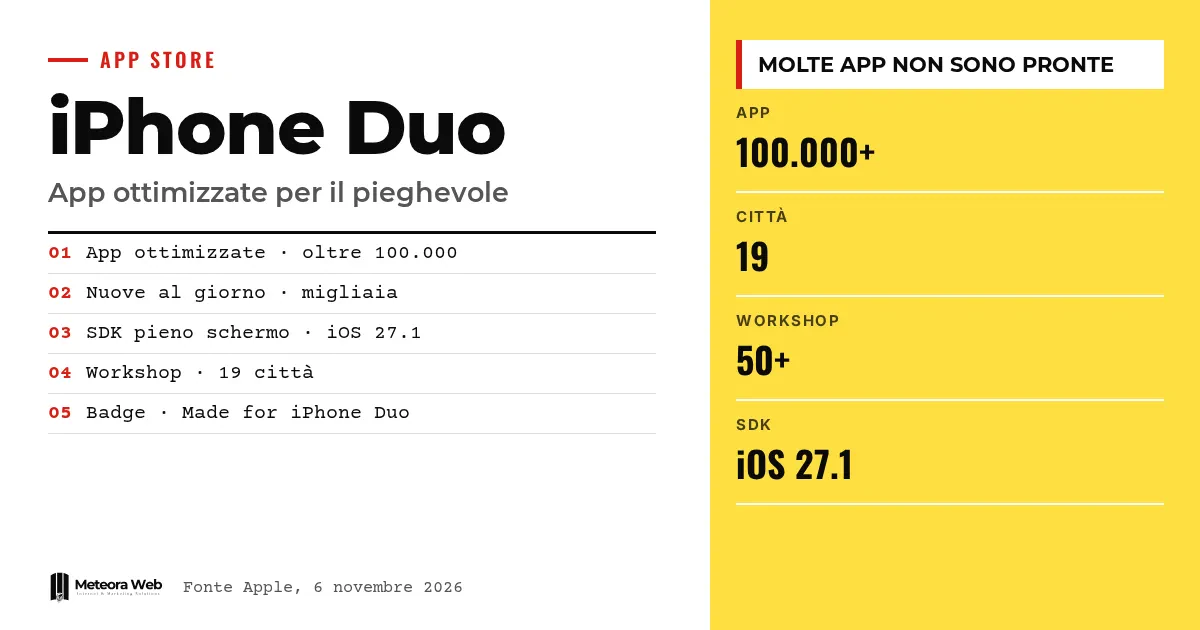
Apple has announced that the App Store now has over 100,000 apps optimized for iPhone Duo, two weeks after the sale of its first foldable. The figure comes from a statement by Susan Prescott, vice president of developer relations. According to Apple, thousands more arrive every day. It matters because early reviews had listed the software among the device's weak points, and because developers now have clear guidance on what to fix.
A few terms before we get into the facts. SDK is the kit used to build an app for a given version of iOS, and it determines how the app behaves. Xcode is Apple's development environment. UIKit and SwiftUI are the two libraries used to build the interface. Size class is the classification of the width and height available to the app. Pose refers to the device's configurations, open or closed.
What did Apple say about the 100,000 apps?
According to MacRumors, which asked the company for confirmation, the figure refers to apps built with the iOS 27.1 SDK or later. These fill the full width of both the inner and outer displays and have vertical controls in the status bar.
Prescott speaks of "well over 100,000 apps" already online and of thousands of optimized apps added every day. These are Apple's statements, not an independent count. Optimized apps show the "Made for iPhone Duo" badge in the App Store listing.
Which apps are ready and which are not?
Among those cited as optimized are Word, Excel, PowerPoint, Zoom, Etsy, Netflix, WhatsApp and YouTube. MacRumors instead lists many apps not yet adapted, including PayPal, Uber Eats, Starbucks, Google Docs and Microsoft Teams.
Even the label does not guarantee a clean result. According to The Verge, at launch Instagram looked somewhat messy despite the badge, and Adam Mosseri described the Duo as a "a bit of a tricky format". We covered this in the first hands-on tests.
How much difference does the SDK you build with make?
The official developer guide distinguishes three cases.
- With the iOS 26 SDK or earlier the app runs, but stays in the center of the inner display with empty space around it.
- With the iOS 27 SDK it fills much of the inner display, avoiding the status bar on the right.
- With the iOS 27.1 SDK or later it uses the full screen, with toolbars and tab bars arranged vertically below the status bar.
Apple advises checking that content holds up under the switch to vertical bars before publishing.
Which code errors need fixing?
Apple lists three families of problems.
Dimensions from the main screen
UIScreen.main should be replaced with the dimensions of the view or window, because a fold can resize the app mid-session. In SwiftUI you use GeometryReader or onGeometryChange.
Orientation
The device's orientation does not tell you what shape the app is. It is better to compare the width and height of the available space.
Idiom and size class
Layout should not be chosen with userInterfaceIdiom, nor should "regular" widths be treated like an iPad. Checks on fixed measurements, such as a height of 844 points, should also be removed. For testing, Apple points to the Xcode 27.1 simulator, the best for the native experience.
Limits to know
The figure of 100,000 is declared by Apple and has not been verified by third parties. We do not know how many are new apps and how many are updates, nor how successful the optimizations are. The figure says nothing about quality. The lists of missing apps come from MacRumors and change every day.
What changes for those who work in digital
If you have an iOS app, check which SDK you build it with. Without the iOS 27.1 SDK your users see an app framed by empty space, on a device that costs over two thousand euros. The same rule applies to clients – ask your provider whether the app is ready. Those who develop iOS and Android apps should search their code for references to UIScreen.main and to the device type. The badge on the App Store listing is also a commercial advantage, as managing the store's rules makes clear.
Our take
Apple's figure should be read for what it is, a statement after two weeks of sales. The same statement admits, however, that many well-known apps are still missing. We find the technical guide more useful than the number. Those who drop assumptions about the device also prepare their app for resizable windows such as iPhone Mirroring, so the work does not serve the Duo alone. It remains to be seen whether the big names still holding back will move quickly.
Frequently asked questions
How many apps are optimized for iPhone Duo?
According to Apple, over 100,000. The company says thousands more arrive every day. The figure is declared by Apple and has not been independently verified.
Do old apps work on iPhone Duo?
Yes, all apps run. Those built with the iOS 26 SDK or earlier, however, appear in the center of the inner display, with empty space on the sides.
How do I recognize an optimized app?
By the Made for iPhone Duo badge in the App Store listing on the device. The badge does not guarantee a perfect interface, as the case of Instagram shows.
Which SDK is needed to use the full screen?
The iOS 27.1 SDK or later. With it the app extends across the entire display, with vertical bars below the status bar.
How do I test an app for iPhone Duo?
With the iPhone Duo simulator in Xcode 27.1, which Apple indicates as the best method. You can also use the resizable simulator in Device Hub and iPhone Mirroring on macOS 27.
The missing apps and the upcoming updates to watch
In the coming weeks we will see whether the names not yet optimized follow the pace Apple has declared.
- Check whether the apps you use every day receive the update and show the badge in the listing.
- If you are a developer, consider submitting Duo screenshots in App Store Connect and applying to be featured.
- Follow news about iOS updates, such as the iOS 27.3 beta, for any new APIs.
Sources
- developer.apple.com
- theverge.com, The iPhone Duo has more than 100,000 optimized apps, Apple says
- macrumors.com, Apple Says More Than 100,000 Apps Optimized for iPhone Duo, Here's What's Still Missing
- hdblog.it, iPhone Duo, già oltre 100.000 le app ottimizzate sull'App Store | Ufficiale
- 9to5mac.com, Apple says there are already over 100,000 apps built for iPhone Duo