 Ing. Calogero Bono
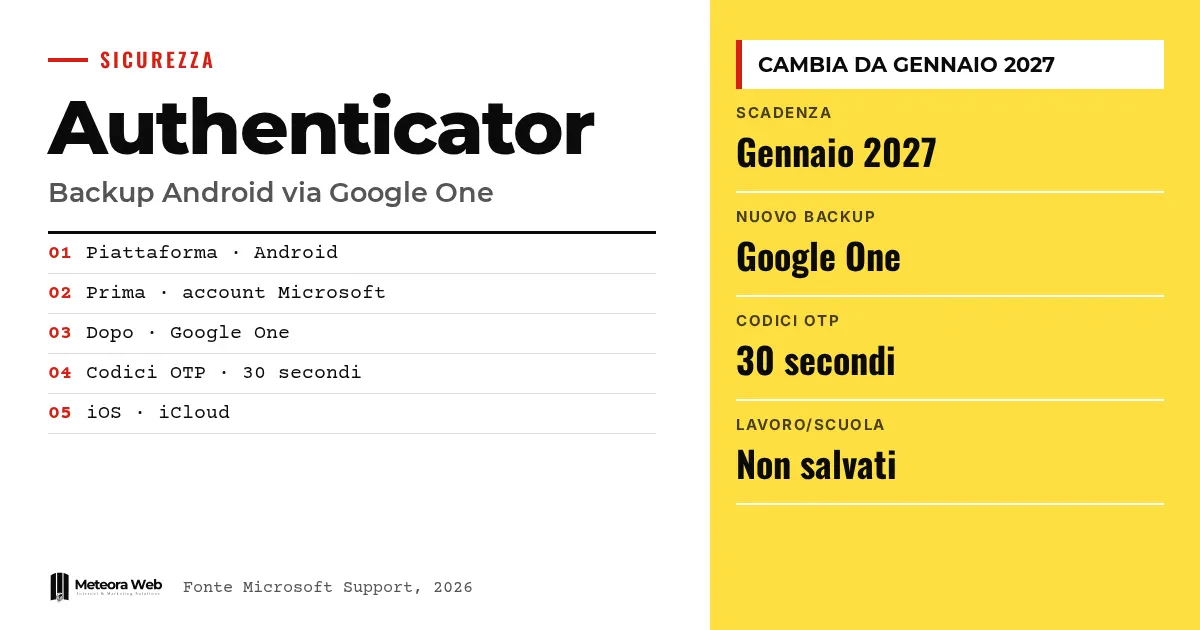
Microsoft is changing how Authenticator backs up on Android. Starting January 2027, the app will no longer use your personal Microsoft account to store one-time codes, and will rely on Google One instead. The company said so on its official support page. If you use the app for two-factor authentication, you will need to check your phone settings so you don't end up without your codes when you change device.
A few terms before we get into the facts. OTP is the one-time code, which in Authenticator's case refreshes every 30 seconds. Two-factor authentication means signing in with a password plus a second element, often that code. Passwordless is sign-in without a password, using a credential tied to the device. Google One backup is the cloud storage of Google for your phone's apps. iCloud is Apple's equivalent on iPhone.
What changes for Authenticator on Android?
According to the Microsoft support page, starting January 2027 you will no longer use your personal Microsoft account to enable backup. You will need to turn on "Microsoft Authenticator" in the Google One backup.
As reported by HDblog, the old system based on the Microsoft account will no longer be used. For Android users, this means checking that the app is included among those saved by Google One on each individual device.
Which accounts are saved in the backup?
For now, the scope remains the one described by Microsoft. The codes that refresh every 30 seconds are saved, for personal Microsoft accounts and for third-party ones, such as LinkedIn and Facebook.
- Personal accounts with passwordless sign-in. The credential is not saved, only the account name remains, and you will need to sign in again.
- Work or school accounts. Credentials are not saved, only the name remains, and you will need to sign in and register the account again on the new device.
Why Google One, specifically?
Microsoft does not explain its reasons in the sources we have. One fact is clear, though. On iPhone, Authenticator has long relied on the iCloud backup, and 9to5Google notes that the move is only partly without precedent, since a similar logic already exists on iOS.
With this choice Android aligns with iOS. The backup depends on the phone's operating system and no longer on a Microsoft account chosen by hand.
Can it be restored on a phone of a different type?
No. Microsoft warns that backup and restore only work on the same type of device. A backup made on iOS cannot be restored on Android.
If you saved the backup to the wrong account, today the procedure is to delete the existing one and create a new one. If "Something went wrong" appears, the guide says it means you have not signed in.
Anyone managing many business accounts would do well to also review how to protect user passwords.
Limits to know
The sources don't say what happens to backups already made with the Microsoft account after January 2027, nor whether there will be an automatic migration. It is also unclear how the procedure changes for those who don't use Google One. Microsoft gives no specific day, only January 2027. The support page could be updated before the deadline.
What changes for those who work with digital tools
For a company with Android phones in employees' hands, backing up codes now depends on the Google settings of each individual device. If your business uses Google Workspace or Microsoft 365, it is worth clarifying who manages the phones and with which account. Keep in mind that work accounts are not saved in the backup, so a fresh registration procedure is still needed. Developers of apps with two-factor access should explain to users how to recover their codes.
Our take
The choice is understandable but it shifts trust. Those who used a Microsoft account for backup will now rely on Google, even though the app belongs to another company. It is one more dependency for a service that should be simple. The notice of more than a year is a positive fact. The risk remains the usual one – whoever doesn't read the notice will discover the problem when they change phone and find their codes gone.
Frequently asked questions
When does the Microsoft Authenticator backup change on Android?
Starting January 2027. From then on you will no longer use your personal Microsoft account to enable backup. You will need to turn on Microsoft Authenticator in the Google One backup.
Does the backup also work for work accounts?
No. Credentials for work or school accounts are not saved. Only the account name remains, and you will need to sign in and register it again on the new device.
Can I restore an iPhone backup on Android?
No. Microsoft states that backup and restore only work between devices of the same type. A backup made on iOS cannot be restored on Android.
Which codes are saved?
Those that refresh every 30 seconds, for personal Microsoft accounts and third-party ones such as LinkedIn and Facebook. With passwordless sign-in the credential is not saved, only the name.
Does anything change on iPhone?
No, according to the sources. On iOS, Authenticator already uses the iCloud backup for accounts and one-time codes.
What to check before January 2027
The change has been announced well in advance, but the details of the transition are not yet known. It is worth following the Microsoft support page and preparing your phones.
- Check whether the Microsoft support page is updated with instructions for migrating existing backups.
- Verify that on company Android phones the Google One backup is active and includes Microsoft Authenticator.
- Note which accounts use 30-second codes and which use passwordless sign-in, so you know what you will need to register again.